Featured Post

Why blog?

Blogging is one way to reflect on our practice as teachers with the purpose of making things better for the future and sharing ideas with ...

Tuesday, May 30, 2017

Transitioning from Teacher-Based to Teacher-Facilitated Learning with Technology (Ken Cooper)

This is in a series of posts by teachers in the TUSD Connect Fellowship for the 2016-2017 school year.  I hope you enjoy reading their reflections on the impact of technology in their classroom, specific tools and strategies that have made a positive impact on teaching and learning, and their goals moving forward.

For me this year technology has impacted my classroom by making me more efficient and taken off the load of having to be the source of information transfer to the students.  Technology has also improved quality of learning as well as the teaching process itself, making it easier to check understanding of ideas and concepts that were once too difficult to check in the traditional manner (verbally or with quizzes).


In the past, my use of technology had been limited to using Haiku as a discussion board and an avenue to take auto-graded multiple choice tests.  I had briefly dabbled in Google Classroom, but underutilized the potential it had.  By becoming involved with the Tech Fellowship, I have gained the confidence to try new tools that I would in all likelihood never have sought out and tried on my own. If it had not been for the Tech Fellowship, I feel the students in my class would have not have been exposed to the same learning environment.  I am truly glad that I took the chance to enter into this program.


Technology has put the learning into the hands of the students in the form of sites beyond that of the old standards of Google and Wikipedia.  Now students have immediate access to tools such as GoFormative, Quizizz, and Edpuzzle (click the links for sample lessons / assignments used).  These tools allow students to gain knowledge either on their own or through collaborative learning - providing students of different learning styles and preferences access to the material. In addition, I have used Haiku discussions in class allowing all students the ability to enter into a class discussion regardless of their public speaking comfort level. Lastly, Google Forms is an easy way to collect data from students on how they perceive the value and effectiveness of a lesson or concept, especially a new way of introducing a topic.


One specific lesson I'd like to share revolves around a hyperdoc my coach and I created about the most important Supreme Court cases that Earl Warren had a part in deciding. The hyperdoc walks you through the 5 tasks that students engaged in over the course of 3 class days.
The goal of this assignment was to expose the students to historic Supreme Court cases that have an impact on our lives as a whole, both through rights of the accused as well as free speech issues.  Students know of their rights but assume that these rights, lawyer, remaining silent, evidence obtained from illegal searches being inadmissible have always been the case.   
By organizing the assignment this way, students understand the time frame in which so many iconic Supreme Court decisions were rendered.  They are amazed that these rights they take for granted were argued and decided less than 60 years ago.
Resources:


Looking Forward...
Next year I would like to start to emphasize and use hyperdocs more to create more long term assignments of more than just a day or two allowing deeper understanding of the impact both short and long term in the material covered in CP US History. I've already started to work on one with my coach about US Foreign Policy over time. It is still a work in progress (I'm prepping it for next year), but you can check out what I have so far here.

Looking Back
I cannot begin to state how effective this fellowship has been on my teaching.  I went from someone who would not use certain lessons that fellow teachers would use because I was unfamiliar with technology or a techno-phobe.  I was leary of using technology solely for the sake of using technology.  Students having their computers in class has gone from once or twice  a week, to nearly daily, such as having a pencil and paper.  The fact that I was willing to try technology to help my students to engage in their learning by the use of technology helped me to get over the fear of the use of technology for things other than attendance and grades. It also help me to see that the things that worked best in my classroom and worked best for my students were usually technology-based.


Ken Cooper is a US History teacher at Beckman High School as well as the ASB Director for the school. He enjoys teaching and the interactions both inside and outside of the classroom. Before coming to teach in Tustin Unified in 1996, he student taught at Troy High School in Fullerton and worked in Orange Unified.


Thursday, May 25, 2017

Thinking About Thinking: Google Forms as a Metacognitive Tool by Tracey Kent

This is in a series of posts by teachers in the TUSD Connect Fellowship for the 2016-2017 school year. I hope you enjoy reading their reflections on the impact of technology in their classroom, specific tools and strategies that have made a positive impact on teaching and learning, and their goals moving forward.

One of the most valuable parts of my two-year experience as a TUSD Connect Fellow has been the focus placed on reflection. During each meeting, my digital learning coach and I reflect on just about everything related to my classroom: student learning, lesson objectives, tech tools, instructional practices. All of this reflection has inspired the use of one of the most impactful tech tools in my teaching arsenal: the Google form.

Google forms have made a significant impact on guiding the instructional practices in my classroom. For most new activities, I request that my students fill out a Google form afterward in order to give me feedback on how effective the lesson’s components were, how much the design of the activity influenced their learning, and how much engagement the activity generated. For example, for our study of the The Great Gatsby, I decided to use Desmos (yes, this is still the post of an English teacher) to facilitate a discussion on symbolism. In small groups, students were given elements from Chapter 5 of the novel to discuss. They were asked to determine if the element was a “symbol” or “not a symbol” and to provide textual evidence with the rationale of their classification. Each group had a student recorder who typed responses for the group into Desmos (I wanted to ensure that the focus was on discussion, rather than each student clicking away silently and independently on their own device). After the class discussion activity, students were asked to complete a short Google form for homework, giving me feedback on how the activity went in their opinion. I find this type of feedback to be invaluable when designing activities to facilitate learning. This activity is only one example of the many types of follow-up forms that I ask students to complete. I have found that these forms help to tailor my instruction to my students’ specific needs.


Students also experience the metacognitive benefits of Google forms. They take greater ownership over their thinking by reflecting on the relative success of a learning experience. They consider what aided their learning, what hindered it, and what was negligible in impact. Forms empower students to think about thinking. Students are also able to rate their own performance and the performances of others in collaborative work. For a major group project, my students were scored on their “professional collaboration.” They were asked to fill out a Google form, rating each group member’s preparation, collaboration, and performance for their project. I received these scores on the corresponding response Sheet, and I averaged students’ evaluations of their peers’ contributions in order to determine their grade. Students rated themselves as well so that their self-evaluation was fairly included in the average score. Google forms also allow students to reflect on the writing process. As part of an essay revision workshop, students volunteered to peer tutor for extra credit. After they completed the tutoring session, they were asked to reflect on the challenges and benefits of peer tutoring and to consider how the process affected their own thoughts about writing. Assignments like these make manifest a student’s thoughts and capture a critical part of the learning process.


Teaching and learning alike are stimulated and refined through reflection. Having an awareness and understanding of one’s thought processes is an important component of any educational endeavor. Students and teachers can benefit from metacognition, and the subsequent reflection it engenders, and the use of technology like Google forms helps to elicit and capture these helpful thoughts.


Tracey Kent has been teaching English at Arnold O. Beckman High School for the past ten years. A lover of learning and literature, Tracey received a Bachelor's degree in English, a single-subject teaching credential, a Master's degree in teaching, and a Master's degree in English literature all from the University of California, Irvine. Teaching combines Tracey's passion for literature, writing, and grammar (yes--even grammar) with her love of learning. She delights in helping to nurture her students' sense of curiosity and nourish their intellects. Tracey is enthusiastic about all forms of expression--literature, art, film, music--and it is this appreciation of culture that most informs her teaching. Technology's impact on art and culture fascinates Tracey, and she looks forward to discovering ways in which she can use technology to help enhance students' literacy.

Wednesday, May 17, 2017

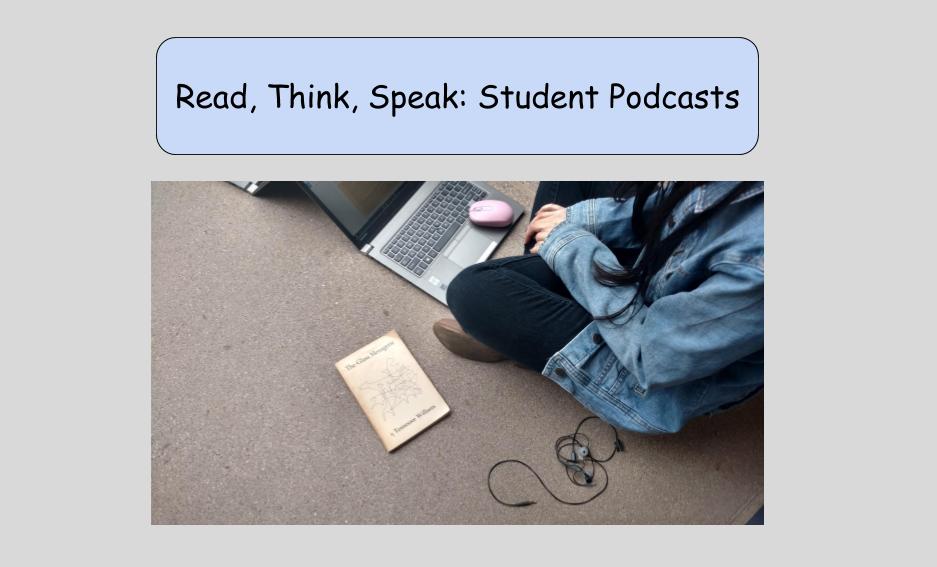
Student Podcasts: A How to Guide


We all have those quiet students who struggle with participating in class discussions. We can sense their anxiety when they are asked to present in front of the class; we can see their eyes darting away from ours when it is time to call on someone to answer a question. I imagine for all of us, there have been years when a student has spent a whole year in our classroom, but we struggle to recall their voice. The reality of having almost forty students in a classroom (times that by five for the whole day) is that it can be incredibly challenging to find ways to ensure that every student is given the opportunity to verbally articulate their thinking, and to ensure that we have the opportunity to hear from each of them. Having students create podcasts is just another innovative way technology can help combat these challenges.


Last week, I asked my students to use Audacity to create podcasts as their end of unit project following their reading of the play The Glass Menagerie. For this project, I had students work with a partner to create an interview style podcast in which one of them played the interviewer, the other the interviewee. The premise was fairly simple: one of them would be playing the host of the show, while the other would be either the author of the play, or one of the three main characters.


While I tried to leave students with some autonomy and choice in regards to the actual content of the podcasts, I did provide a significant amount of support during the planning and creating stages. Before launching into anything, I highly recommend having students listen to a podcast of their choosing as an easy homework assignment the night before introducing the project. When I debriefed with my students the next day, they were able to share what they noticed about both the content and design of the podcast they had listened to which segued nicely into my introduction to their assignment.


Since the technology we were using was new to my students, my fabulous tech coach, Crystal Kirch, created a “how to guide” for them. I gave them time at the beginning of the first period, before even introducing the details of the project, to play around and familiarize themselves with the tech. I encouraged them to create a practice recording with their partner, so they could try out the different editing features included with the program.   


Everything I read online indicated that students would need more time to map out their podcasts than they would actually need to record them--I found this to be true. If you decide to have students work in groups or with a partner, definitely set aside at least one class period for them to plot out their script.


By using the script template, students were able to map out their show, determine length and content of individual segments, and brainstorm potential questions and answers to cover. The script became an important tool for them when they rehearsed and then finally recorded their podcast.


The day of recording was an opportunity for my students to exercise their independence, and for me to gather informal feedback. While walking around, I was able to observe each partnership as they navigated both the tech and the task. I was most impressed by their creativity, their adeptness with using Audacity for the first time, and their willingness to take risks while learning.  For me, my tech journey this year has been not just about my ability to use technology to teach content, but about how to teach my students to use technology to demonstrate their learning and thinking.

Student Podcast Example


To draw a conclusion to their podcasts, I had my students complete two assignments: one was a short writing assignment drawing on the content of their podcast, the second was a group peer evaluation on Google Forms. Since the podcasts ended-up being ten to fifteen minutes, I knew the reality was that I wasn’t going to be able to listen to each in its entirety in a timely fashion. By having them complete the Google Form evaluation on another group, I was able to push immediate feedback out to them in a Google Doc.   


Looking Forward


Reflecting back on this project, I am excited to consider other ways to use student podcasts next year. While I was very happy with how these turned out, I also like the idea of the podcast not being a one time event. I think the idea of monthly or quarterly podcasts would be really interesting. As always, when I try a new piece of technology, if it gets me thinking about future uses, I know it was a success.

Happy Podcasting!

Thursday, May 4, 2017

The Hype Surrounding Hyperdocs

GUEST POST by Tala Pirouzian, HS English Student Teacher


One of my favorite aspects of planning and organizing information for my students is Hyperdocs - a phenomenon my mentor, Erin Thomas, introduced me to in the beginning of my student teaching. The ways in which my mentor created and used Hyperdocs served as a model for me and paved the way for my fascination with using Google Docs for a creative learning purpose. There is a reason they are called Hyperdocs: links, visuals, information, charts, anticipation guides, student responses, etc., can all be integrated into one document for learning purposes. The Hyperdocs are an interactive resource in that each student has their own copy and can access the material, organize some of their notes, and create projects or study guides.


Here is a model of Hyperdoc I created:

Why Hyperdocs are Valuable 
By creating a Hyperdoc, I was able to not only plan the specific content I wanted students to learn but also organize the order in which they processed and learned it. Yes, it can work as another version of lesson planning! 

The unit of study becomes enhanced as the material is [resented in a visually organized manner, with a balance of images and text, for students and each section of the Hyperdoc builds on the previous one. 


Furthermore, while the information can be accessible in the slides, having the key images and concepts on the Hyperdoc re-emphasizes the importance. For example, inserting the family tree image within this Hyperdoc increases students' exposure to it for each time students access the Doc they are also revisiting prior knowledge. This not only helps visual learners but also engages all students because I believe the different links, slides, clips, and images are a form of differentiation for students with diverse learning styles. 


Additionally, the boxes inserted within the Hyperdoc ask students to summarize and respond to the information with their own words, which positions them as an active participant and contributor. I like to think of Hyperdocs as a blueprint for students to develop. 


Going to the next level... Student-Created Hyperdocs!

After giving students several Hyperdocs in different units (Lord of the Flies, Macbeth), we asked them to create their own as a part of their Outside Reading Book (ORB) project. The content that students were expected to include in their Hyperdocs, such as a list of questions and connections, were provided to them, but they were given full creativity in how they organized the material and included a balance of text, links and images. 
As my students began working on the Hyperdocs, some would ask “how do we create one?” A valid question indeed in that I had the same question when I first learned about Hyperdocs. Simple.
My students were as surprised as I was about how easy it is to create a Hyperdoc. A few students said but it looks so fancy and complex!

I continue to be impressed at the Hyperdocs submitted as they not only showed students level of creativity but also the depth to which they thought about the novel.


Student Samples:

Sample Ex 1:


Student Ex  2: 
The second sample is on Stedman's The Light Between Oceans. This student not only organizes all the required content in a meaningful manner but also presents video links as support for their author/context introduction, and a powerful balance of written commentary and visual evidence. Furthermore, this student clearly categorizes the different forms of questions that they have constructed with potential response boxes; thus, it is a usable document. 
Click here to see the sample!

Student Ex 3:
All The Light We Cannot See. The student has a unique strategy for organizing the content and justifying their connections to other literature. Furthermore, this student's has adopted an alignment with the characters from their outside reading book for they have connected certain features of the characters in All the Light We Cannot See to other characters. This is powerful in that the student is referring to prior knowledge, and making connections between in and out-of-school practices. Another key feature of this Hyperdoc is that the student identified abstract ideas or features, such as injustice, point of view, character development, etc., that suggest what the open-ended questions they raised are about.
Click here to see this student sample!

One final note:
In essence, Hyperdocs are valuable and useful for interactive learning, student engagement, differentiation purposes, application of Common Core Standards, increased collaborative work, fostering creativity, formative assessment, etc. 

As I reflect on my understanding and use of Hyperdocs thus far, I believe that it is a powerful tool for organizing information in a particular manner, encouraging students to develop their habit of note-taking, and deepening student thinking in the classroom. For example, students build on their speaking, listening, reading and writing skills as well as practice content and academic language in one or multiple lessons that incorporate Hyperdocs. 


Considering 21st century learning and Webb's Depth of Knowledge, I would say there is and will continue to be a movement towards innovative learning where students are increasingly empowered to "create," "design," "analyze," "connect" and "synthesize," all of which are  part of the purpose for using Hyperdocs as a part of the learning process. 


Also, as efficient it is to create Hyperdocs, it is also enjoyable grading student-made Hyperdocs!

Monday, April 24, 2017

The Thumbs Up and Down of My Tech Experiences: Pear Deck

GUEST POST by Tala Pirouzian, HS English Student Teacher

As I reflect on my student teaching experience thus far, I have not only enjoyed experimenting with the different technology to support and engage my students in their learning but also have learned from them. While I will be sharing some of my most memorable and successful lessons, I would also like to share ones that have been more challenging than I imagined. The one that first comes to mind is Pear Deck. This is a multidimensional tech tool with a unique system set up, but it can also be quite overwhelming the first time a teacher, especially a new teacher, uses it.


Pear Deck

First, let me provide some context for the lesson before explaining the benefits and challenges of using Pear Deck. I used this tech tool during a lesson that also featured a competitive game element in that students worked in teams of four to six to justify their analysis of the text.

Each question posed to students had two parts to it:
First students would type in a quick response (thumbs up/down to indicate agree or disagree, or one word response), which served to check understanding and offer clarification on the topic
Next, we would review the answer and then students would work in their team to find textual evidence that best supports the assertion/topic.
For example:
LOTF Ch. 7 Modified.pptx (33).jpg
Or...
LOTF Ch. 7 Modified.pptx (31).jpg
LOTF Ch. 7 Modified.pptx (32).jpg
Some of the questions had several correct textual evidences; thus, I had to switch between different slides in order to double check that the textual evidence students selected corresponded with the ones on the “survey says” list. A part of this has to do with experience and familiarity with the text too in that for this lesson it was a balance of comfort with the tech and proficiency with each significant passage within the novel. Thus, I do believe that as one gets more familiar with teaching a certain novel, this allows for more risks and novelty with tech activities.
Furthermore, as students read their textual evidence I was listening to see if they were reading the passage that contained the specific literary device. For example, in some instances students would read textual evidences that were close or part of the page but did not contain the actual language or literary device. The pressure of time also contributed to the challenging aspect of the lesson and tech.
One of the most challenging management aspects of Pear Deck for me was the display format in that there is a projector and a dashboard setup. The desktop computer is on projector setting so that the electronic whiteboard displays what the students will see on their screens, yet on my laptop I have a dashboard display setup so that I can check their short response data, read their incoming responses, lock/unlock the response page, highlight student answers, and reveal the answers.


The different features of this tech tool are useful and valuable because it keeps students engaged and allows the teacher to assess students responses in real time. For example, during the lesson, I was able use the tech tool to display student responses as models or to use the visual data of the “thumbs up/thumbs down” as an assessment of any remaining misunderstandings, confusions, or understandings  about a topic, character, or literary device. There are so many options and features embedded in PearDeck, such as designing slides with clips, images, questions, and text, selecting from different types of student responses (multiple choice, short response, agree/disagree), and managing the responses by highlighting certain student answers, making the student work anonymous, etc.  
After reflecting on this particular lesson, I believe that there was a discrepancy between how I envisioned and practiced the tech tool to work, beforehand with my mentor, and how it actually worked out during the lesson because there were many moving parts. However, students were engaged in the content learning and given the opportunity to practice their close-reading, literary analysis, justification, vocabulary, listening, and speaking skills with this interactive tool. Next time I use PearDeck, I will have had experience with the tech formatting and will make appropriate adjustments to the task. Although this was one the most challenging lessons and tech tools that I have used thus far, I would definitely use it again and do recommend it to others because with practice comes competence and development.

Thursday, April 20, 2017

Gradual Release of Responsibility: Common Core Style

  POST by Erin Thomas, HS English Teacher

The final quarter of the school year is always my favorite, and not just because summer vacation is finally in view. My students and I spend much of the year in a metaphoric handhold, as I guide, lead, and model them through the content, until suddenly, they seem ready to let go.

But let's face it: letting go can be hard. Can we trust them to maintain a high level of discussion, if we aren’t the one playing the facilitator? Will they stay focused and on task? How will I know what they get out of the discussion, if I am not listening to every word spoken throughout a discussion? The reality is that all the hand-holding we do the first half of the year, is exactly why we should trust them to do all of these things. Whether the class is CP or Honors level, they can be trusted, as long as we have taught them how to use the tools they will need.


For me, the close of the third quarter coincided with the end of our All Quiet on the Western Front unit, so I needed this discussion to draw a conclusion to all the work we had been doing. Since our curricular units are all Common Core based, we had been analyzing the novel in connection to essential questions and a number of connected ancillary texts. It was important to me that my students demonstrated that they could apply what I had been modeling for them all year, by writing their own questions and bringing in their own outside sources.


Preparation:

The set-up for this discussion was fairly simple, but somehow ended up infusing all of my favorite things, both tech and content wise, from this year!

Students did not go into this discussion cold. I explained that they would be participating a Six Person Panel Discussion (named so mostly because it sounds fancier than working in group of six), and I provided them with the handout which outline what would be covered.


In addition to reflecting on the ancillary sources I had provided over the course of the unit, students were asked to bring in their own annotated sources.


Getting them Organized and Letting them Go:


On the day of discussion, I had students simply draw a color which determined their group assignment.


I tend to shift back-and-forth with assigning roles during discussions, but for this activity, since I was going to be an observer, I knew I wanted them to have assigned responsibilities.


After assigning roles and discussing expectations, I put the timer on for twenty minutes, and just let them go. It was amazing to watch them navigate this discussion. Every group talked for the entire twenty minutes, and every student, even my quietest ones, participated multiple times throughout the discussion. Watching my sophomores interact with each other, as true academics, was incredibly gratifying.


After a quick, share-out from each of the groups, I had them take one final step. Since I wasn’t able to sit with each group for their entire discussion, I wanted to find a way to still hear from all of them.

Bringing it to a Close:


Let's Recap is tech tool which allows students to quickly create short videos. It's great to use when you want to hear from all of your students, but you just don’t have enough minutes in the class period. For this discussion, I essentially used it as an exit slip. In the last few minutes of class, I had students log in and informally tell me about one ancillary source shared by a peer in their group. If you haven’t used this tech tool before, I highly recommend it. It is user friendly, easily viewed and assessed, and best of all, guarantees that you will hear from every one of your students!


This discussion definitely ended-up being a standout for me for the whole year. Everything that I asked of my students felt meaningful, and best of all, their skills and intelligence were able to shine!

Happy Discussing!

Thursday, April 6, 2017

Literary Blocks

GUEST POST by Tracey Ryan, HS English Teacher

Everything in the English classroom is dependent on students reading the assigned texts.  I am always trying to figure out ways to engage students - to make them go back into the text to further their understanding.  Too often - I have them respond to quotes and write a "chunk."  For each chunk, students respond by providing context, close text analysis, and purpose. It's essential for them to understand how authors make meaning, but my selection of the quotes and the formulaic ways they are required to respond puts the onus for understanding and learning on me rather than the students.

After reading read a blog post from Dawn Lam [Mrs. Lam's Musings], I decided to "borrow" her idea of modifying the game "Cards Against Humanity."  I purchased wooden blocks from Amazon and wrote on each side a different literary device.  My class had finished reading the first four chapters of Lord of the Flies. Instead of me dictating what the students would examine in the first four chapters - I let them roll the block to determine what literary aspect of the first four chapters their group would examine.


After rolling for their literary device, the group had to figure out how they would present their analysis.  We've practiced with a few tech tools this year so I gave them free choice as to how they wanted to present their findings.  My suggestions included;  Google Slides, Google Drawings, Adobe Spark, Infographics, Hyperdocs or even just a Google Doc.    Most students played it safe and went with Google Slides but some ventured into Google Drawing, Adobe Spark, and Popplet.  Examples of some of the final products follow:
Imagery - Google Drawings


Characterization of Jack - Adobe Spark 


Analysis of Conflict - Google Slides


Analysis of Symbolism - Popplet


After sharing the assignment with my grade level team we came up with a series of variations on how to grow the assignment.  

  • Roll two blocks - one for the literary device - the other for the purpose.  We came up with two separate lists.  The device list included:  conflict, characterization, syntax, motif, imagery, figurative language (metaphor/simile, symbolism, personification, etc.).  The purpose list included:  theme, character,  setting, tone, mood/atmosphere, and point of view. Some of the devices are interchangeable with the purposes. (Thanks C.Kirch for the suggestion)
  • List the lens of literary criticism on the sides of the block and have students roll to determine through which lens they will examine the text.

Thursday, March 30, 2017

The Deadly Red Pen Strikes No More: Grammar Instruction Enters the 21st Century

Post by: Tracey Ryan, High School English Teacher

Grammar is not the reason I became an English teacher.  It's not sexy.  It doesn't require higher order thinking.  In fact - grammar might be the only place in an English classroom where there is an explicitly correct answer --  none of that gray area that makes the study of literature so endlessly fascinating.  Instead, grammar requires adherence to a set of seemingly arbitrary rules.  These rules, however,  help students navigate difficult text and write cohesive essays.

Each year as the grammar books grow older and the model sentences more obscure, I religiously dust the books off and trudge through grammar instruction.  The goal is to start with the rules, practice the skills and then apply.  Current trends advocate teaching grammar in context - the drill is "dead."   However, we don't send basketball players out to play the game without hours of dribbling and passing practice. It's only after they've mastered the skills that players enter into a real game situation. In the same manner, before I send students out to read complex text or write analytical essays - we practice the fundamentals of grammar.   Once we have a basic understanding of the grammar rules, we move on to the application of those rules.  For example, my sophomores open the year with phrases and clauses (after a crash course in parts of speech).  Once we've mastered the rules - we apply the skills to our own writing before ending the semester with the syntactical analysis of Dicken's A Tale of Two Cities.  For me, the difficulty with the direct instruction of grammar comes with trying to differentiate it.  Some students are able to quickly grasp the rules while others struggle.  Enter NoRedInk.

NoRedInk provides lessons, practices, and quizzes that help students to master selected grammatical skills. It allows students to work at their own pace and tailors the questions to student interests.  The company offers a free version and a premium version.   My experience is with the free version.

The program is easy to navigate.  I set up my classes once and then assign lessons, practices, or quizzes to the students.  It as easy as going to NoRedInk.com and signing up with Google.

Step One: Set up classes.


Step Two:  Select the lesson or practices 
The lessons available include active vs. passive voice, phrases, clauses, sentence structures (compound, complex, etc), punctuation, parts of speech, misplaced/dangling modifiers, parallel structure, and agreement,  They even have practice on embedding quotations and topic sentences.  I choose to go through the rules whole class and then assign practices which students can work through at their own pace.  NoRedInk offers diagnostic tests, practices, and quizzes.  With this option, students go through the lesson on their own and then practice the skills as needed.  Once you've decided on how grammar instruction will work in your class and are ready to select the assignment, go to taskbar select assignment and choose the practice.


Step Three:  Assign students the lesson or practice
Beware the practices run from super easy to fairly challenging.  There is also a preponderance of practices.  My first experience with NoRedInk, I overloaded my students.  I learned to trust the suggested time allotments offered by the program. If the program says the practices will take 10 minutes to complete, the average student will complete it in 10  minutes.   Below is an example of Active or Passive Voice lesson and a sample question on that topic.


Sample passive voice question.


Students work at their own pace, answering increasingly difficult questions until they reach mastery. If, however, they miss a series of questions - a review of the skill will pop up and students have an opportunity to review the rule before they move on.

Step Four: Once students have completed the practice - the teacher can follow-up student learning by looking at the data compiled during the lesson. After examining the data, the teacher can decide to assign more practice or assign a quiz.


NoRedInk is a really simple alternative to grammar books. Even on the free site - there is a sufficient range of topics and practices to engage and teach.  Some students did get frustrated that they'd be one problem from mastery, miss a question and have to go back and restart the process.   NoRedInk requires students to get three correct answers at each level before they can reach mastery.  In spite of their frustration, students came away knowing that they mastered the skills.

The first time, I assigned a set of grammar practices - I went way overboard with the sheer number of skills I required my students to master.  Now I limit the number of practices I assign. Instead of being tied to a computer for the period I try to pair the practice with a writing assignment that requires students to use the skills that they've been practicing.

I just introduced the ever difficult who/whom conundrum.  My students are already asking when they get to practice with NoRedInk.  A sure sign that something good is happening.

My students' reaction to NoRedInk.
  • I love NoRedInk. It is super helpful!
  • I liked the exercises we did on NoRedInk and I felt that it genuinely helped me in real-world examples of grammar usage. Even though it is kind of cheesy, I definitely appreciate having it as a learning tool to help me practice.
  • I think that NoRedInk was beneficial because it gave a lot of repetition which is necessary for grammar -  practice makes perfect. It also gave good, simple lessons to help us understand the concept. 
  • It's fun and I feel it helps me practice and understand grammar better!