Featured Post

Why blog?

Blogging is one way to reflect on our practice as teachers with the purpose of making things better for the future and sharing ideas with ...

Showing posts with label Google Docs. Show all posts

Tuesday, June 6, 2017

Constant Reflection & Improvement (Kristen Hammer)

This is in a series of posts by teachers in the TUSD Connect Fellowship for the 2016-2017 school year.  I hope you enjoy reading their reflections on the impact of technology in their classroom, specific tools and strategies that have made a positive impact on teaching and learning, and their goals moving forward.

This is my second go around as a fellow, and I think this time I truly understood and benefitted from the process.  Technology has impacted my teaching and my students in a variety of ways.  I think one of the most beneficial ways has been through a what I would call a semi-flipped class.  The ability to have students be prepared through watching a video, and answering questions before coming to class for a lab or lecture has saved us time and we can spend more time on labs and hands-on activities in class.  I haven’t used a total flip, but the implementation of what I have done I can say that the prior knowledge on a topic or lab has gone up.  The class has the ability to be front loaded before coming to class and I have seen a better participation rate in answering questions about the topic.  I have saved time going over procedures that I have had to do in the past during class time.  I know I still want to work on the participation rate, and I think if I start these with guidance in class they will see the benefit of completing outside of class.


I have also used videos when I know I am going to be out of the class with a substitute.  The videos have ensured my students don’t get behind with materials or instructions when I am out.  It’s business as usual, and I don’t feel that I am wasting a day when I am out.  I can give them notes as if I was there, go over homework, and ask them questions.


I believe I have also improved my formative assessments using technology.  I have instituted Quizizzes again this year, but this time I have required the students to meet a minimum % to receive credit for the assignment.  This makes it so they have to keep trying and not give up after one attempt.  I have seen a greater participation rate when I tie it a grade.  They also seem to do better on their tests.  The students also love Quizlet live, so I really like having that available during class for a quick review before a test or quiz.


Looking Ahead...
As I think about my continued goals and next steps, there are several areas that I was able to explore with my coach this year that I want to continue to revamp.

I tried a menu assignment that I really liked this year.  This assignment gave the students choice on what genetics problems to complete.  They had to complete so many in a set, but they got to choose.  I polled the students and they said they liked the choice.  I also have given them choice in doing some assignments digital or paper.   I would like to do more choice assignments in the future.  There is a bigger buy-in with these types of assignments.


I am also looking into digital notebooks, and the idea of Google Sites for the students to keep their science work sounds, and looks really cool.  I need to research this more over the summer to implement this next year.

I made a couple of hyperdocs this year for the students to use and follow through the units.  I would like to continue this.  I see the benefit of having a one stop shop for the students to see where we are going in a topic or unit.

I also need to rethink my digital labs and doing them in Google Docs or Google Forms.  I was really bad about timely feedback when they are digital, so I think if I use the sites idea there could be more timely feedback.  I will continue to revise and revamp my lab write-up process.

I tried implementing Classroom Dojo, and it was helpful, but not exactly what I am looking for in a randomizer.  I will continue to think about this, and find the tool that works for me to make sure students are engaged and all students are participating.  Overall, I think my student engagement has improved, but I still would consider this an area to continue to improve upon.

Obviously, a big thing coming is NGSS implementation, and my curriculum will be changing due to this.  I have a lot of work ahead to make what I have now fit into the new standards and performance expectations.

Reflections on being a Fellow...
The fellowship has been extremely beneficial having someone to bounce ideas for curriculum implementation and revision off of.  Two heads were always better than one.  I believe the fellowship is only as good as what the fellow puts into it.  I was willing to try most things, some failed and some succeeded, but I feel that it pushed me more than I would have normally.  I enjoyed working with my coach, she was the perfect match for me.  She let me vent, but then got me back on track with the work ahead.  I felt if I wasn’t moving forward I was letting her down, and I didn’t want to do that.  If I thought of something, and posed a question to my coach, I always knew I was going to get a response about the idea or question.  I also needed the reminder of why was I doing something, was it going to enhance my teaching and the students learning, or was it just a replacement for the same.  I am better at reflecting on my use of technology and when and where it is best suited.

I loved that fact that although my coach wasn’t a science teacher in her past, she always tried to find examples and ideas that suited to science. This has been a worthwhile experience, and I will continue to consider my coach as my DLC (Digital Learning Coach) even if I am not going through the coaching cycle each week with her.


My name is Kristen Hammer.  I have been teaching science for 17 years.  I am currently teaching Biology, and my  science department’s chair.
I received my undergrad from Northern Arizona University in Zoology and my Master’s and teaching credential from National University.

I believe in making curriculum accessible and meaningful for all students.  I feel that each year of teaching should look new and different with the implementation and revision of a teacher’s art; their curriculum.

Monday, June 5, 2017

My Year of Looking Through the Lens of Technology

This is in a series of posts by teachers in the TUSD Connect Fellowship for the 2016-2017 school year. I hope you enjoy reading their reflections on the impact of technology in their classroom, specific tools and strategies that have made a positive impact on teaching and learning, and their goals moving forward.


As I reflect back over the past ten months, I would have to say that being a part of the TUSD Connect Fellowship has been one of my favorite things about this school year. It isn’t just that technology has reinvigorated my teaching  practice and made the content more engaging for my students, which it has, but rather it is what I have gained through the process of having an instructional coach. In September, when I began this process, my expectations were simple:


I will know the fellowship has been successful if feel more confident about integrating technology and if my students are ready for what’s next because of what they've done this year.


Oh, how far we have come. I have to say “we” because I truly believe that it was having the opportunity to have purposeful, one-on-one coaching that has made this such a transformative process. If someone had asked me last year what tech I consistently used in my classroom, I would have replied “Powerpoint, books, pens, and highlighters. Those are all technically tech, right?” My greatest fear with infusing technology into my curriculum was that it would cause my students to become disconnected from each other and from me. I had horrifying visions of a sea of forty heads all zoned into computer screens searching for answers on Google, rather than thinking aloud and arriving at conclusions with another human being. Perhaps I had been reading too much dystopian literature, but I worried that technology would somehow suck the life out of the content and the process of learning--I couldn’t have been more wrong.


How Technology has Helped my Students Stay Connected

Despite my many fears, this year has taught me that tech can enrich student discussions. Two of the new discussion activities I created this year that I am most proud of are a Four Corners Discussionwhich focuses on how to move online discussions into classroom discussions, and a Six Person Panel Discussion, which focuses on using technology to increase student independence and talk-time. My belief that the increased use of technology in my classroom would cause a decrease in their When I polled my students, both of these discussions were ranked as their favorites for the year.


How Technology has Encouraged my Students to Become Lifelong Learners


I am always searching for ways to encourage my students to “wonder” while learning. As I mentioned earlier, one of my main concerns with technology is that it would students to search for answers online, rather than actually engaging in the critical thinking required to arrive at their own conclusions. My Adobe Spark Blog is about a three-part project using the video slide show technology to encourage students to explore essential questions over a lengthy unit of study.


How Technology has Inspired Creativity in Me and My Students


One of my biggest revelations about technology in the classroom is that it won’t drain humanity out of my curriculum. The projects I have designed this year that make me proudest are the ones which reflect both how technology has inspired my creativity, and my student’s. My Student Podcast Blog on students podcasts is a perfect example of how technology can be used to make a richer learning experience.


Participating in this tech fellowship, and working with an instructional coach, has been the best thing I could have done for my teaching practice. As I look forward to the next school year, my main goal is to build on what I have created this year. While I have specific ideas about new ways to use technology (hello, Google Sites), what I am most focused on as a professional is continuing the cycle of reflection that has been established by my coach this year. I never thought that I would grow as much as I did, and I certainly never thought that I would be as excited about what technology can bring to the classroom as I am.

This year has been a journey for both me and my students. As I have grown, they have grown, and I am looking forward to what is to come next year.

Happy Summer!


Erin Thomas has been teaching English Language Arts in Tustin Unified School District since 2005. She received her B.A. in English, teaching credential, and Master's in Education from Concordia University, Irvine. Erin grew-up in a house filled with books, in fact every room contained its own bookcase, which instilled her a life-long passion for reading and a love language. As a teacher, Erin hopes to foster that same love of literature in her students by giving them opportunities to read deeply and often, and by encouraging them to share their understanding of what literature reveals about the human spirit.

Thursday, May 4, 2017

The Hype Surrounding Hyperdocs

GUEST POST by Tala Pirouzian, HS English Student Teacher


One of my favorite aspects of planning and organizing information for my students is Hyperdocs - a phenomenon my mentor, Erin Thomas, introduced me to in the beginning of my student teaching. The ways in which my mentor created and used Hyperdocs served as a model for me and paved the way for my fascination with using Google Docs for a creative learning purpose. There is a reason they are called Hyperdocs: links, visuals, information, charts, anticipation guides, student responses, etc., can all be integrated into one document for learning purposes. The Hyperdocs are an interactive resource in that each student has their own copy and can access the material, organize some of their notes, and create projects or study guides.


Here is a model of Hyperdoc I created:

Why Hyperdocs are Valuable 
By creating a Hyperdoc, I was able to not only plan the specific content I wanted students to learn but also organize the order in which they processed and learned it. Yes, it can work as another version of lesson planning! 

The unit of study becomes enhanced as the material is [resented in a visually organized manner, with a balance of images and text, for students and each section of the Hyperdoc builds on the previous one. 


Furthermore, while the information can be accessible in the slides, having the key images and concepts on the Hyperdoc re-emphasizes the importance. For example, inserting the family tree image within this Hyperdoc increases students' exposure to it for each time students access the Doc they are also revisiting prior knowledge. This not only helps visual learners but also engages all students because I believe the different links, slides, clips, and images are a form of differentiation for students with diverse learning styles. 


Additionally, the boxes inserted within the Hyperdoc ask students to summarize and respond to the information with their own words, which positions them as an active participant and contributor. I like to think of Hyperdocs as a blueprint for students to develop. 


Going to the next level... Student-Created Hyperdocs!

After giving students several Hyperdocs in different units (Lord of the Flies, Macbeth), we asked them to create their own as a part of their Outside Reading Book (ORB) project. The content that students were expected to include in their Hyperdocs, such as a list of questions and connections, were provided to them, but they were given full creativity in how they organized the material and included a balance of text, links and images. 
As my students began working on the Hyperdocs, some would ask “how do we create one?” A valid question indeed in that I had the same question when I first learned about Hyperdocs. Simple.
My students were as surprised as I was about how easy it is to create a Hyperdoc. A few students said but it looks so fancy and complex!

I continue to be impressed at the Hyperdocs submitted as they not only showed students level of creativity but also the depth to which they thought about the novel.


Student Samples:

Sample Ex 1:


Student Ex  2: 
The second sample is on Stedman's The Light Between Oceans. This student not only organizes all the required content in a meaningful manner but also presents video links as support for their author/context introduction, and a powerful balance of written commentary and visual evidence. Furthermore, this student clearly categorizes the different forms of questions that they have constructed with potential response boxes; thus, it is a usable document. 
Click here to see the sample!

Student Ex 3:
All The Light We Cannot See. The student has a unique strategy for organizing the content and justifying their connections to other literature. Furthermore, this student's has adopted an alignment with the characters from their outside reading book for they have connected certain features of the characters in All the Light We Cannot See to other characters. This is powerful in that the student is referring to prior knowledge, and making connections between in and out-of-school practices. Another key feature of this Hyperdoc is that the student identified abstract ideas or features, such as injustice, point of view, character development, etc., that suggest what the open-ended questions they raised are about.
Click here to see this student sample!

One final note:
In essence, Hyperdocs are valuable and useful for interactive learning, student engagement, differentiation purposes, application of Common Core Standards, increased collaborative work, fostering creativity, formative assessment, etc. 

As I reflect on my understanding and use of Hyperdocs thus far, I believe that it is a powerful tool for organizing information in a particular manner, encouraging students to develop their habit of note-taking, and deepening student thinking in the classroom. For example, students build on their speaking, listening, reading and writing skills as well as practice content and academic language in one or multiple lessons that incorporate Hyperdocs. 


Considering 21st century learning and Webb's Depth of Knowledge, I would say there is and will continue to be a movement towards innovative learning where students are increasingly empowered to "create," "design," "analyze," "connect" and "synthesize," all of which are  part of the purpose for using Hyperdocs as a part of the learning process. 


Also, as efficient it is to create Hyperdocs, it is also enjoyable grading student-made Hyperdocs!

Monday, February 27, 2017

Desmos in ELA...Isn't that a math tool?

In an 11th grade Honors English class this past week, students were discussing Chapter 5 of The Great Gatsby with a focus on the different symbols throughout the chapter.

We designed a Desmos Activity that allowed the students to work through the potential symbols collaboratively in groups of 4.   For each element, they had to decide between "symbol" and "not a symbol".  Once they selected their choice, they were prompted to explain their reasoning with textual evidence.  After they submitted their explanation, they were able to see up to three other group's explanations before moving on.  The activity was student-paced so all groups were working at different paces and were able to take the time they needed to think through their responses without the pressure of being "moved on" with the rest of the class.


As they worked through the activity, the teacher was able to monitor student thinking through the Desmos Teacher Dashboard.


After the groups finished working through the Desmos activity, they were given the link to an individual hyperdoc that had mini-screencasts where the teacher recorded herself explaining whether or not each element was a symbol or not.  Students then were able to listen to the teacher's instruction at their own pace, take any needed notes, and fill out a column that asked them to compare the teacher's explanation to their original choice.

The final activity of this lesson was for students to look at the book so far (Chapters 1-5) and find one additional symbol that wasn't in the activity and explain why it was a symbol by using textual evidence.


We chose Desmos because it allowed the activity to be self-paced and also allowed groups to view other group's thinking after they submitted their thoughts.  Both of these features seemed to be essential to the success of the activity


In addition, we chose to put the teacher's explanation on screencasts so students were able to access them at their own pace when they were ready for it (i.e. after they had worked through the activity fully themselves).  In the past, class time was used for this explanation, which decreased the amount of student discussion time that could occur.  With the redesign of this lesson, students had an entire class period to discuss symbolism.

Overall, the activity was highly successful.  The students were engaged in the small group discussion, and the tools we chose (especially the self-pacing and ability to still collaborate cross-group by seeing others' responses) allowed for ample processing and discussion time to ensure students met the learning objectives for the day.  Desmos is definitely a tool that will be used again!

Here is some more student feedback on the activity:


  • I thought the desmos activity was very effective and helpful in recognizing the differences in symbols and figurative language or archetypes.
  • I think desmos is a great way to work in groups and think about different topics. It was a different way of doing things, so it definitely made it more interesting. :)
  • I enjoyed the peer-feedback in order for better understanding of the symbol as students can see the perspectives of their peers. I also thought the process from question to question flowed smoothly and I believed it worked out really well.
  • Having a student-paced activity like this made discussion effective in keeping time and staying on task.
  • It was a nice change of pace in order for the discussion to be more interactive online and for it to be student paced because sometimes i don't understand things in discussions and in this types of discussion we can talk about it more and come to a conclusion
  • I think Desmos was the most effective technology resource introduced this year. The fact that we were allowed to see peer responses helped facilitate peer-to-peer interaction and collaboration among students. Considering that the activity was student paced, I think Desmos allowed me and my peers to fully contemplate our responses before submitting them.
  • It ran smoothly and the transition between desmos and screencast was easy. However, in the future I would do our groups thoughts for one symbol, then the screencast, then our notes on whether we were correct or not, then the next symbol. This would make it easier to remember our thoughts, and I think it would flow better.
  • I liked how Desmos enabled us to move at our own pace, yet would have preferred if everyone wrote for themselves in order to increase engagement in the activity.
  • The student pacing and ability to see student responses were the most effective as they allowed more control to be placed in the hands of the student. This helped my group better understand the content as we were allowed to spend as long as we needed on a question, but could also reflect and compare our thoughts with other groups.
  • I liked this activity because instead of having it on a written activity it is a memorable thing as we were able to work in groups, agree and disagree, as well as see your face and be able to play it multiple times. The group recorder in my group kinda just wrote without telling us what he was writing which was the only issue. A suggestion is that maybe we could rotate around the laptop and have us all write.

Wednesday, July 20, 2016

Improving Student Learning through Instant Feedback & Constant Communication (Tracy Dawson)

This is in a series of posts by teachers in the TUSD Connect Fellowship for the 2015-2016 school year. I hope you enjoy reading their reflections on the impact of technology in their classroom, specific tools and strategies that have made a positive impact on teaching and learning, and their goals moving forward.

Technology has transformed my classroom this year!

I have infused technology in my lessons in previous years but through this Technology Fellowship I have created a learning environment that is dynamic, effective, and efficient for my students all driven by the purposeful use of technology.  I teach Human Body Systems (HBS), AVID, and Biology CP and I have integrated technology into each of them in different ways.  

One of the major shifts this year in HBS is making my labs digital.  There is a lot that goes into digitizing a lab so the process has been quite an undertaking but the benefits make it completely worth the time invested.  I utilize Google Classroom in HBS (as well as in AVID and Biology).  The organization of Google Classroom and Google Drive has been a great way for my students to have a place to go to for all labs/handouts/links/announcements/etc.  It avoids students being confused on where to go to get the document or link and it allows for students to have a “homebase”.  In HBS, the students complete a lab about once a week and before digitizing my labs I was not completely satisfied with the way I was checking their progress or their understanding besides informal assessments and check-ins and Friday Quizzes (which at that point was a bit late).  I now can give every student real-time feedback as they are completing their lab through the great collaborative feature of Google Docs.  I have a running dialogue with my students about their lab and it is a place they can ask questions and I can clarify key points as well as checking in on their progress on the lab.  My HBS students are very comfortable with Google Classroom and Google Drive so I can ask them to take pictures of their dissections spur of the moment and they are able to digitally label them in a Google Drawing and upload them to Google Classroom so I can grade their dissections more thoroughly and they can have their labeled dissection to review. Here is an example of a labeled Digestive System from the Fetal Pig Dissection.  


Here are a few other ways technology impacted teaching and learning... with samples for you to look at!
  • I embedded Quizlets into GoFormative for all three of my classes as formative assessments as well as review for the students.  Here is an example of a quizlet embedded into GoFormative for a Biochemistry review for my Biology CP class.  


  • Google Drawings - The students created Google Drawings of concept maps for the Endocrine System as well as for the Insulin/Glucagon Feedback Loop in the Human Body.  Here is a Student Sample of the Insulin/Glucagon Feedback Loop.  In previous years, I had the students draw their concept maps and feedback loops on paper and I was not able to fully review them until they turned them in which was on the day of the quiz so it was too late to fix major misconceptions.  Having the students create them on Google Drawings allowed me to write comments on them as they were making them so misconceptions were dealt with right away.    

  • I also used Quizizz, Socrative, Let’s Recap, and GoFormative to do concept checks and for the students to review for the quizzes and tests in our class.  Anatomy has a lot of terms that the students need to know and the spelling is important so the Quizlets I embedded into GoFormative were particularly helpful because they tested my students on definitions, spelling, and being able to label diagrams.

  • I also utilized Google Forms (for reflections and to collect data), Padlet (get to know activity, summing up lessons, and reflections), and ThingLink (making a diagram of a cow eye more dynamic by adding “tags” to label each part, stating its function, and inserting videos).

  • AVID - Digital Journals (student-teacher dialogue), Google Forms (grade reflections, submitting questions for Socratic Seminars).  All of these allowed me to actually read and provide timely feedback to each of my students which was more difficult and time consuming to do when they wrote their journals on paper.  Before I digitized the journals and reflections in AVID, it took me so long to read them and I felt that in the time it took for me to get my written feedback back to my students, part of the impact of the feedback was lost.  Now, I am able to give immediate feedback and it helped me in the beginning of the year to get to know my students very quickly.

  • Biology - Collaborative labs on Google Docs, Google Forms (submitting lab data, reflecting on test/unit/grade in class), Google Slides (visual vocabulary), Google Drawing (Karyotype Activity), Quizizz, GoFormative, and Padlet.


I am very excited to continue to refine my use of technology in my classroom next year.  This summer, I plan to complete the certification and exams to become a Google Certified Teacher (Levels 1 and 2).  I am also planning on taking two technology courses online (“Flipping the Classroom” and “All Things Google”).  Finally, my new obsession, Twitter!  I will continue to connect with educators on Twitter to grow and develop my purposeful use of technology in the classroom.

I cannot begin to say how impactful this fellowship has been on my teaching practice.  I went from someone who would sometimes shy away from using certain things because I assumed the students wouldn’t have their devices (mostly in Bio) or not knowing if it was going to work well to now wanting to try every awesome idea that I come across!  Like most things in a teacher’s classroom, if it is set as an expectation from the beginning of the school year, then a teacher will have a lot less trouble during the year.  In my class, having your device everyday is like having a pencil and paper.  I also found the more willing and open I am to trying new things in my classroom, the more willing my students are.  There were times when I used a certain technology in my class and I thought “that was okay” but I can make it way better by tweaking a few things or using a different technology to accomplish the same goal in a more effective manner.  But the fact that I was not afraid to try the technology and my students were willing to engage in their learning through the use of a specific technology helped me to discover the things that worked best in my classroom and worked best for my students.

Tracy Dawson is a Human Body Systems, Biology, and AVID teacher at Beckman High School in Irvine, CA.  She is an innately curious person and considers herself a “lifelong learner”.  Tracy is a self-professed science and tech nerd and loves to be constantly adding to her “tech toolbelt” and enhancing her teaching and her students’ learning through the purposeful use of technology.  Tracy also serves as AVID Coordinator and a mentor teacher in the science department.  

Tuesday, June 7, 2016

Improving Student Interaction Through Technology (Chris Veitch)

This is in a series of posts by teachers in the TUSD Connect Fellowship for the 2015-2016 school year. I hope you enjoy reading their reflections on the impact of technology in their classroom, specific tools and strategies that have made a positive impact on teaching and learning, and their goals moving forward.


Entering into this fellowship, my goal was to see how the use of technology can improve my student’s learning. As someone who is relatively proficient in tech and can navigate my way around most software I know the importance of being “tech literate” in the 21st century, however as a new teacher I question where to efficiently incorporate that technology into my teaching.


Being a fellow this year and exposing my students to the opportunities that technology can bring to a learning setting, I am convinced of its importance and will be planning my future instruction through the lens of how technology can enhance my lesson. This praise should also come with a qualifier. Technology is not a band-aid that can “fix” poor instruction or take over for a human teacher. Technology is simply an ingredient that should be a part of  the “dough” of education, in that technology provides tools to enhance a lesson and force students to take control of their own education.


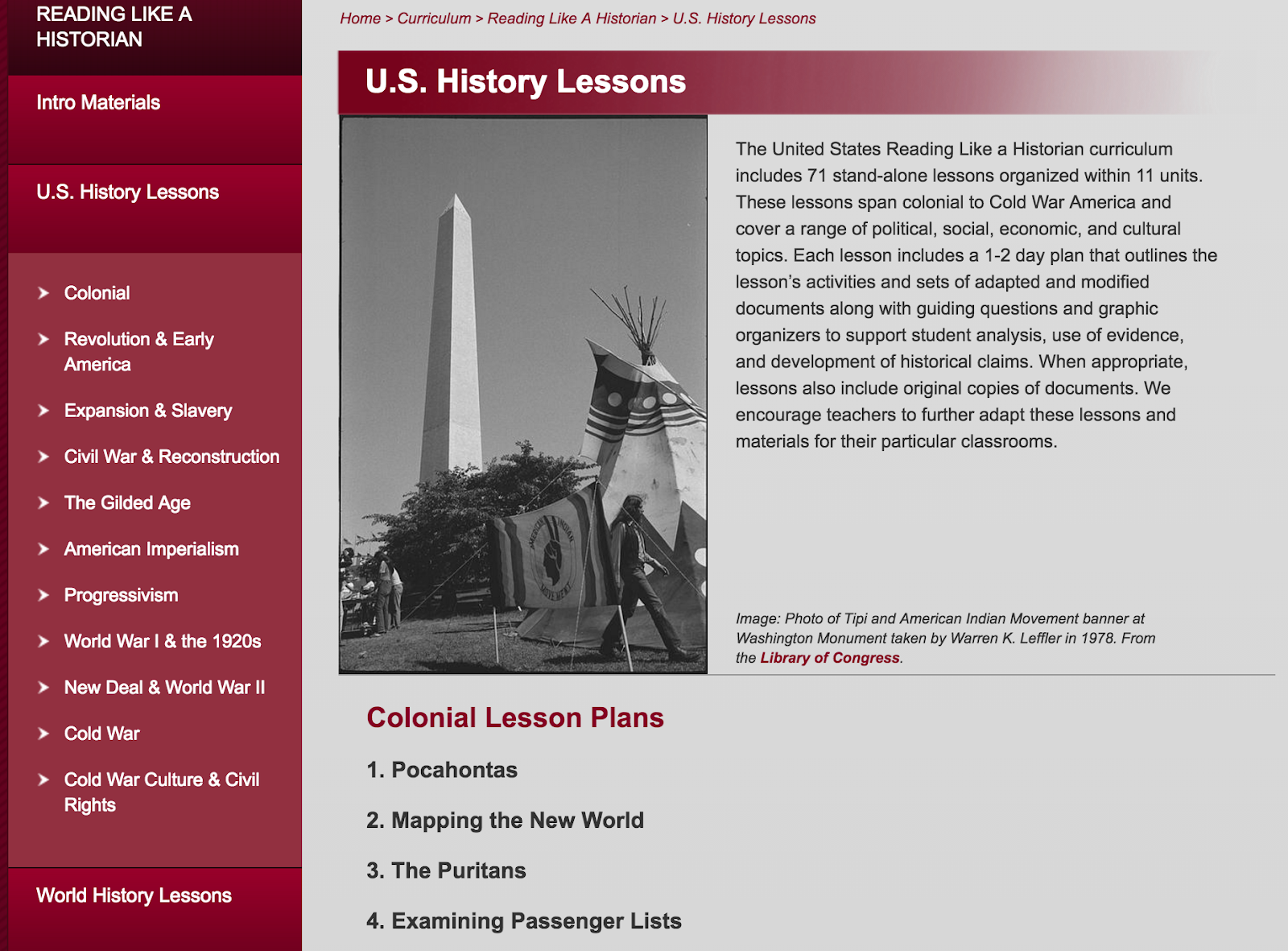
Through technology students can collaborate in ways not possible before, students can become “historians” whereas before they were simply note takers, and students can challenge the material where before they simply had to take the information provided to them on face value. As a history teacher, one of the most important aspects of my teaching is that students are historians in my class. And by analyzing multiple sources, students begin to pick out of the nuances of a topic and discover that the issue is not simply “black or white” or “right and wrong”. One of my favorite sites to gather these multiple historical documents is the Stanford History Education Group. (Featured on this site)

This site follows the current Common Core standards of multiple text analysis and finding the many perspectives that are inherent in this types of lessons. In addition, this site provides for guiding questions and pre-built lessons that educators can use or modify as they see fit. One of the most convenient aspects of this site is that the the primary sources can either be used modified (to fit the learning styles of all readers) as well as the full documents themselves. This allows for differentiation among classes. This is important for me as a CP U.S. History teachers as students enter into my classroom with all different skill levels. As such, it is important to challenge all students to rise to their own ability level and this site provides several helpful tools in order to accomplish this goal.

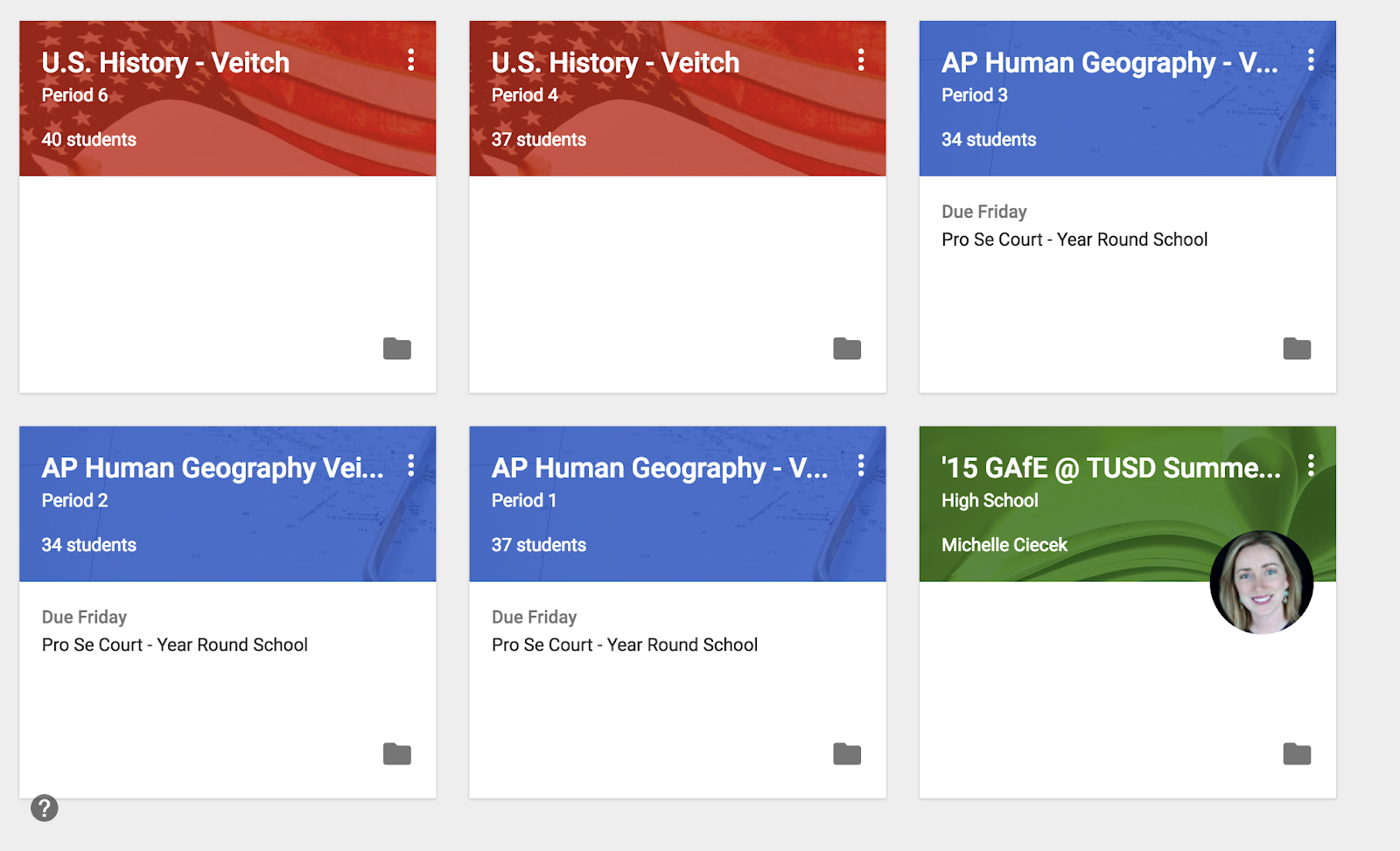
Another powerful tool that I have been able to utilize this year has been Google Classroom. My students and I have all been well versed in the multiple Google Drive suite of applications and their wonderful collaborative uses. However, there was never a centralized hub in which to properly distribute those lessons and activities out to the students. This problem has been solved with the use of Classroom. Google Classroom allows teachers to set up their classes similar to the Haiku platform and make use of the already existing knowledge students have of
Google Drive.
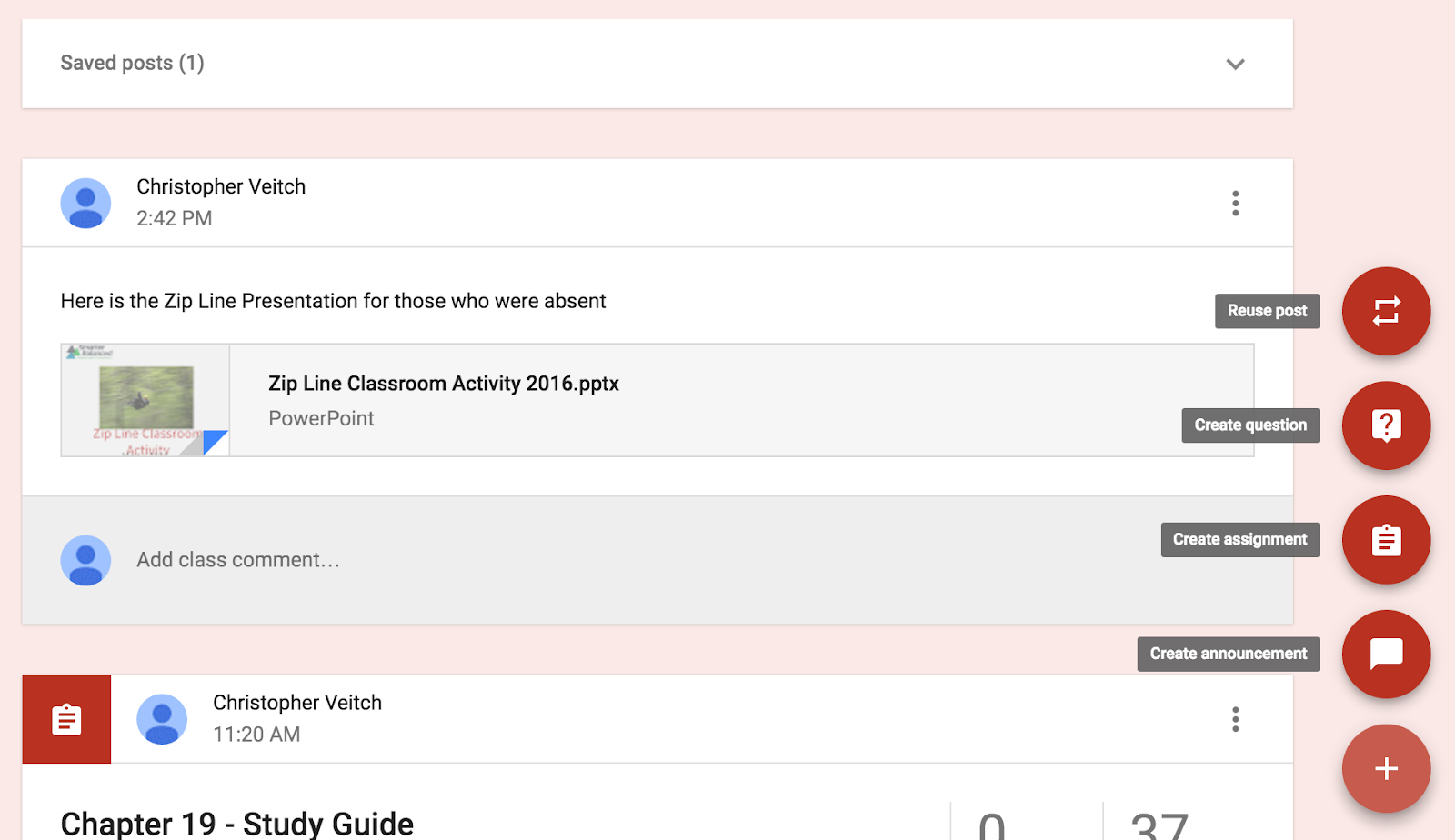
This classroom is then used by your students as their resource hub. Classroom contains all activities and additional material you would wish to use for your classroom. Students also turn in all material that you assign them through classroom no the need for huge stacks of paper and the question of “What did I miss yesterday” becomes a thing of the past as students know where to locate their material as each assignment is dated and appears in a list-like format.


This application has made life easier because it already utilizes everything I had done last year in terms of assignments and Google drive, but now it all exists in a centralized and organized location. Adding announcements and additional links are as simple as hitting the plus button on the lower right of the screen and pasting your announcement or link and documents can be uploaded from either your Google Drive folder (recommended) or uploading documents off of your desktop. Overall this tool, while simple, has made the biggest impact in my teaching this year.


Additionally, I was fortunate enough to be selected to speak during the TECHstravaganza where I was able to introduce the collective power of the Verso discussion app and the collaborative power of the Google Drive suite of applications, specifically utilizing Google Docs. As mentioned above, I have pushed this year for my students to think more like historians and through the interaction of primary source documents (from the SHEG group mentioned above) I wanted my students to interact with history as historians. By utilizing Google Docs and SHEG i have allowed students to interact with these documents in a group setting, using Google Docs, and address essential questions on their own. Normally this is where the lesson would end and the students would turn in their material. 

However, I have also wanted to push my students to interact critically with each other’s writing and this is where Verso comes into the picture. Verso allows for anonymous interaction between students with only the teacher being aware of any one commenter's identity. I found this to be important because students tend to interact with people they know and often choose not to step outside their comfort zone. With Verso students do not know who they are interacting with, which produces more meaningful interactions. Students are tasked with posting their essential question responses on Verso and other are randomly assigned to engage with the question and determine where there can be improvements. After receiving this feedback students then revise their questions and repost their responses. This allows for students to assess their own writing style and get a chance to review others at the same time. Slides from the presentation are provided here.


I knew going into this year that being a tech fellow would provide a challenging and meaningful opportunity for me as I would be exposed to more technology and classroom training. As mentioned above, this is my second year in the teaching profession and new teachers are always looking for some simple ways to make their lives easier. Being a tech fellow has improved my teaching confidence by giving me the tools to succeed. I owe a huge debt of gratitude to my coach, Crystal Kirch, and know that while there is no real proper way to thank her for all that she has given me, I can show my appreciation by using all the tools she has given me to be the best teacher that I can.


Chris Veitch is a second year Social Science teacher at Beckman High School teaching U.S. History and AP Human Geography. He received his bachelor's degree from U.C. Santa Barbara in the field of Law and Society. Chris sees technology as not simply a component of education but a tools that needs to be in every teacher’s toolbox.